
Virtual private networks were once associated mainly with specialists: network administrators, security professionals, and employees connecting to an organization’s internal systems from outside the office. For these users, a VPN was a practical networking tool. It created an encrypted connection between a device and a trusted network, helping remote users access work resources while reducing the risk of exposing information across public internet connections. The technology existed well before it became a familiar feature in consumer software, but its everyday visibility was limited.
That changed as remote work expanded, particularly during the COVID-19 pandemic. When offices closed and employees began working from home, many organizations relied on VPN connections to let staff reach company files, applications, and other systems. For people who had never used one, connecting to a workplace VPN became part of the routine of logging in for the day. This experience introduced a much wider audience to the term, even though an employer-provided VPN and a consumer VPN service may serve different purposes and operate under different policies.
VPNs are now marketed directly to consumers, and some browsers include VPN-like features or offer them as built-in services. These tools can make private browsing options easier to find and use, but the label alone does not explain what a feature protects. A browser-based VPN may handle only traffic routed through that browser, while a device-wide VPN can cover other applications as well. The provider, technical design, and settings also affect what information is concealed and from whom. As a result, users should not assume that turning on a VPN makes them anonymous or secures every part of their online activity. The central question is therefore straightforward: what does a browser VPN actually do, and how much security should users reasonably expect from it? Answering that requires looking beyond the familiar name to the connection it creates, the traffic it covers, and the limits that remain.
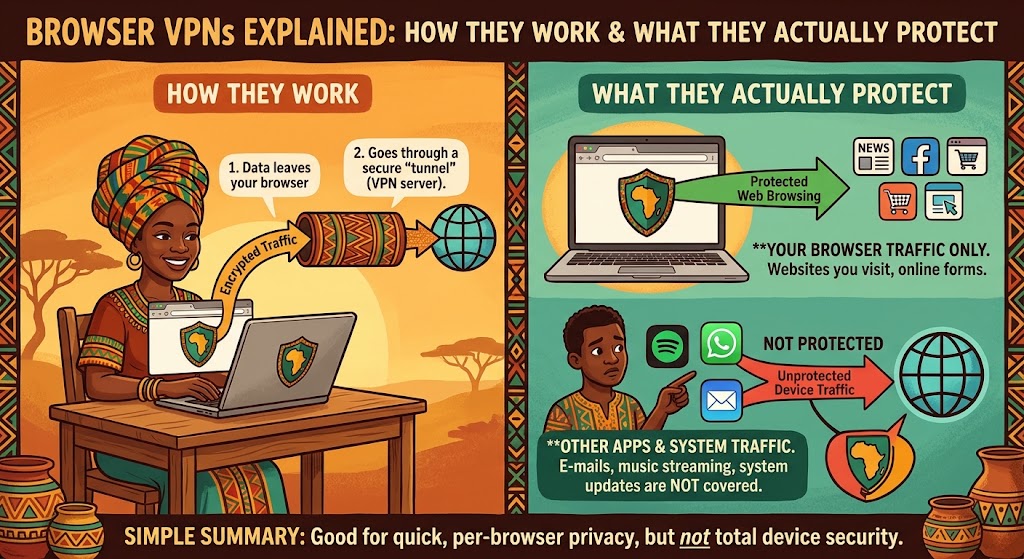
A VPN connection creates a protected route between a device and a server operated by the VPN provider. When supported traffic leaves the device, VPN software encrypts it before sending it across the internet to that server. The server decrypts the traffic as needed and forwards requests to their intended destinations, such as websites or online services. Responses travel back through the server and the protected connection to the device. This process can help prevent other parties on the local network from easily reading the traffic covered by the VPN, although it does not make that traffic invisible to the VPN provider.
Because the VPN server contacts websites on the user’s behalf, those sites generally see the server’s public IP address rather than the user’s usual public IP address. This can make a connection appear to come from the server’s location, but it does not guarantee anonymity. Websites may still identify visitors through account sign-ins, cookies, browser fingerprinting, or other information. A VPN also does not automatically protect against malicious downloads, phishing, or every form of tracking. What it changes is the network path and the address presented to the destination, not every way a service can recognize or monitor a user.
The key distinction is which traffic enters that protected route. A browser-integrated VPN or proxy feature may handle only requests made through that particular browser, while other applications—such as email clients, games, or messaging software—continue using the device’s regular connection. Device-wide VPN software can route traffic from other apps as well, though its coverage may depend on settings, exclusions, and the operating system. The terms “VPN” and “proxy” can also describe different technical arrangements, so a feature’s label alone may not explain its scope. Before relying on any service, check the provider’s documentation for which browsers, apps, and connection types are covered, and whether exceptions apply. Do not assume that enabling a browser feature protects every connection on the device.
A browser VPN may be useful when connecting through public Wi-Fi in places such as cafés, hotels, airports, or libraries. By routing covered browser traffic through an encrypted connection to a VPN server, it can make that traffic harder for other people on the same network to inspect. This is an additional privacy layer, not a guarantee of safety: websites may still track activity, and a VPN does not prevent phishing, malware, or unsafe downloads. The connection’s protection also depends on the VPN provider, the browser’s configuration, and whether the relevant traffic is actually routed through the VPN.
Another common use is masking a home internet address from websites visited in the protected browser. Those sites generally see the VPN server’s IP address rather than the household IP address, which may reduce direct exposure of that network identifier. It does not make a person anonymous. Accounts, cookies, browser fingerprints, and information voluntarily supplied to a site can still link activity to a user. In addition, a browser VPN may cover only browser traffic; other apps on the device could continue using the regular internet connection. Users should check the product’s coverage and settings before relying on it for a particular purpose.
A VPN can also provide access to online services whose availability or content varies by location, where accessing them this way is permitted. Service terms, local laws, and licensing restrictions may apply, and providers may block VPN connections, so access is not assured. For work, an employer-approved and properly configured VPN can help remote staff connect to internal resources, such as company applications or file systems. Employees should use the organization’s instructions rather than assuming a consumer browser VPN is suitable for workplace access. In every case, practical benefits depend on the provider’s trustworthiness, chosen settings, which traffic is covered, and broader security habits, including updated software, strong authentication, and careful handling of links and sensitive information.
A browser VPN can improve privacy in specific circumstances, but claims of “comprehensive security” overstate what it does. It encrypts traffic between the browser and the VPN server, helping protect data from some observers on the local network, such as users of public Wi-Fi. Beyond that connection, protection depends on the websites visited, the browser’s settings, and the provider’s service. Encryption to a VPN server is not the same as end-to-end encryption, and it does not make every online activity secure.
A VPN also does not make users anonymous. Websites and online services may still identify people through account sign-ins, cookies, browser fingerprints, or other tracking methods. A VPN cannot reliably prevent phishing, remove malware, stop someone from taking over an account, or make an insecure website safe. It may conceal a user’s IP address from a site, but that is only one potential identifier. Users still need to assess links, downloads, permissions, and the security of the services they use.
Using a VPN shifts some trust from an internet provider or local network to the VPN provider, which can handle connection data. Before choosing a service, review its privacy policy and logging practices, including what information it collects and how long it retains it. Consider who owns and operates the company, whether independent assessments have tested its claims, which jurisdiction governs it, and how its business is funded. These details help readers evaluate whether the provider’s incentives and practices align with their privacy needs.
There are practical trade-offs as well. Routing traffic through another server can reduce browsing speed, and a connection may fail or disconnect. Browser-only VPN products generally cover traffic from that browser, rather than every app or service on a device; coverage can also vary by feature and configuration. A VPN is best treated as one privacy and security measure, not a complete solution. Keep software updated, use strong authentication, browse carefully, and follow employer-approved access controls when handling work systems or data.